
EN
TripDoc

TripDoc AI Talk, the 24-hour AI consultation desk for hospitals that never miss a patient

Manage messengers from around the world on one screen while an AI trained on your hospital's information consults patients in their own language, 365 days a year, 24 hours a day. Night and weekend inquiries turn into bookings, and the AI handles the confirmation, reminders and revisit messages that follow.

  • KakaoTalk
  • Naver TalkTalk
  • WhatsApp
  • LINE
  • WeChat
  • Instagram
  • Facebook Messenger
  • Telegram

How many of these apply to your hospital's patient consultations?

If even one applies, inquiries are slipping away right now. What you need is not more staff but a new system. Here are five situations hospitals often face and how TripDoc AI Talk changes them.

What hospitals experienceTripDoc AI Talk
Inquiries that arrive at night or on weekends are answered the next day365 days a year, 24 hours a day, the AI replies in the patient's language the moment an inquiry arrives and suggests available appointment times.
During weekday hours the coordinator clears a backlog of replies instead of doing their real workRepetitive inquiries are handled by the AI. The coordinator arrives to a list of bookings made overnight and only the conversations that need a human check.
Replies written with a translation tool sound awkward and the treatment explanation gets lostAn AI trained on your hospital's specialties, treatments and procedures explains things naturally in response to the patient's actual question, not from a fixed script.
KakaoTalk, LINE and WhatsApp each need a separate login to checkConversations from eight messengers appear on one screen, so domestic and international patients are handled in one place.
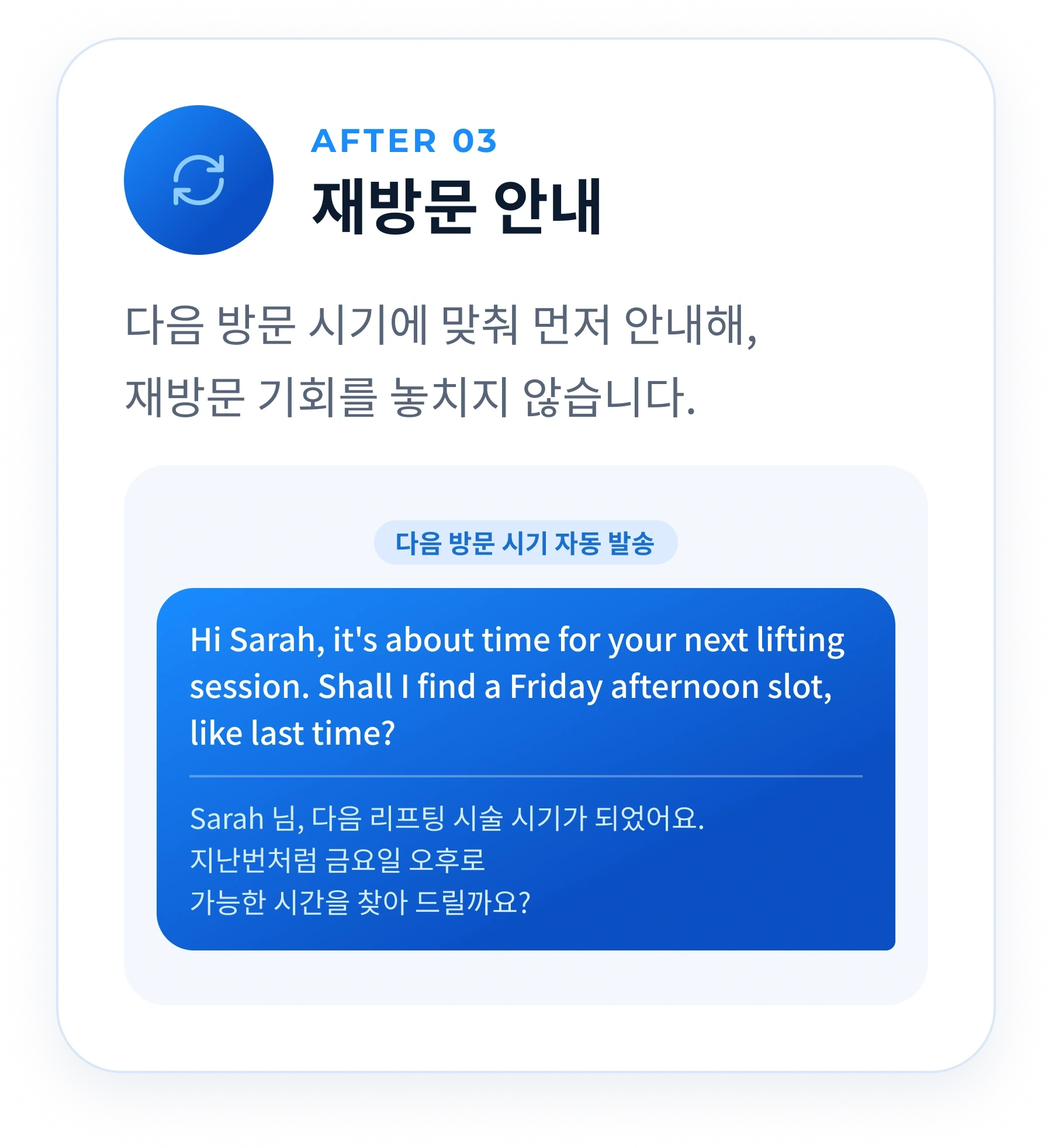
Guidance after booking and revisit contact fall through the cracksBooking confirmations, day-before reminders and revisit timing messages are sent automatically in the patient's language.

Left as it is, how much does a hospital miss each month?

Here is an example for a hospital that receives 100 inquiries a month. When a reply is slow or the translation is awkward, the patient books with another hospital that answered right away, and the replies that pile up overnight push back the next day's work.

patients a month who leave while waiting for a reply
24
a month spent clearing a backlog of replies
40 hours
patients missed over a year
288
spent on backlogged replies over a year
480 hours

Example calculation (TripDoc AI Talk proposal, October 2026): of 100 inquiries, 40 arrive outside clinic hours and 24 of those are lost, and clearing the backlog takes 2 hours a day over 20 working days a month. These are assumptions, and actual figures differ by hospital. Inquiries missed while checking each messenger separately, and revisits lost for lack of reminders, are not included.

What does TripDoc AI Talk do?

Consultation, channel management, mobile monitoring and post-booking care: four jobs in one system.

Instant replies 24 hours a day, 365 days a year: multilingual consultation that knows your hospital

Inquiries are answered at once, even at dawn, on weekends and on public holidays. An AI trained on your hospital's information explains treatments and procedures in the patient's language and guides them to a booking. Your staff see the Korean original alongside every message.

  • Immediate replies at night and on holidays
  • An AI trained on your hospital's information
  • Replies in the patient's language, checked in Korean
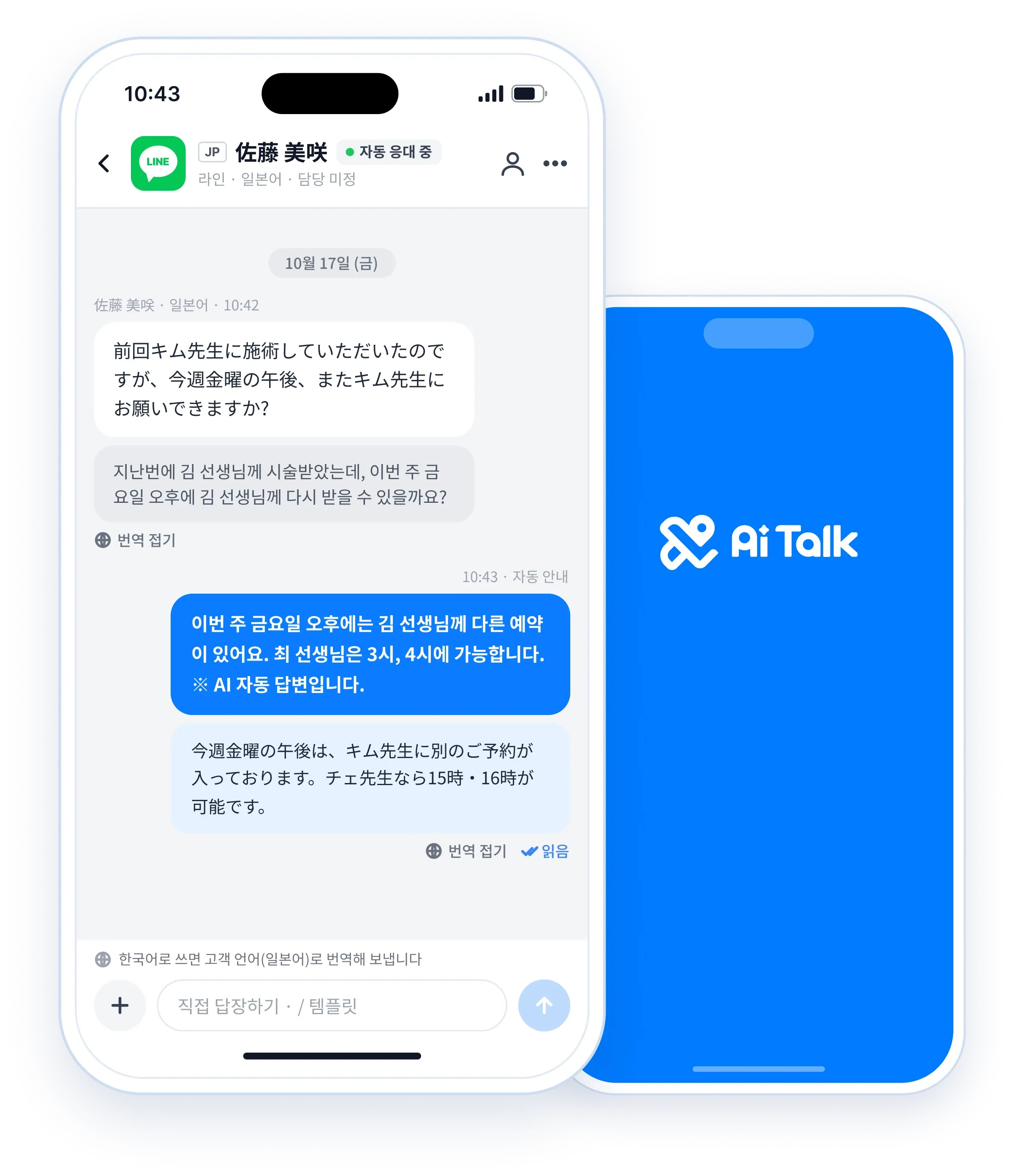
TripDoc AI Talk app screen where the AI answers a Japanese inquiry from LINE with the doctor's available appointment times

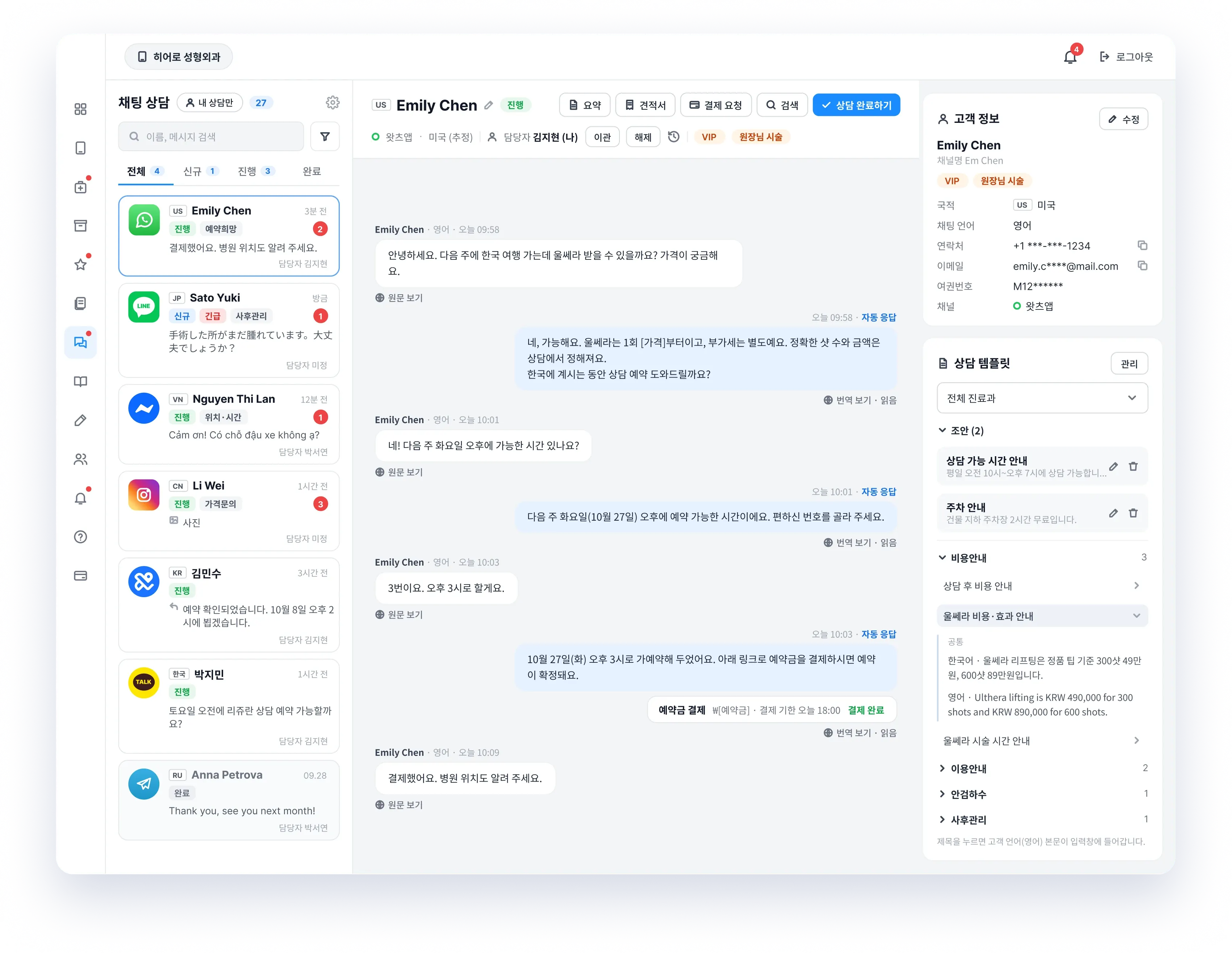
Scattered messenger channels, managed together on one screen

From local patients on KakaoTalk and Naver TalkTalk to international patients on overseas messengers, you can manage eight channels in one place.

  • KakaoTalk, Smart TalkTalk
  • LINE, WhatsApp, Facebook, Instagram, Telegram, WeChat
  • Original and translation side by side
  • Inquiries that need a check, and reply speed
TripDoc AI Talk message center showing conversations from several messengers on one screen

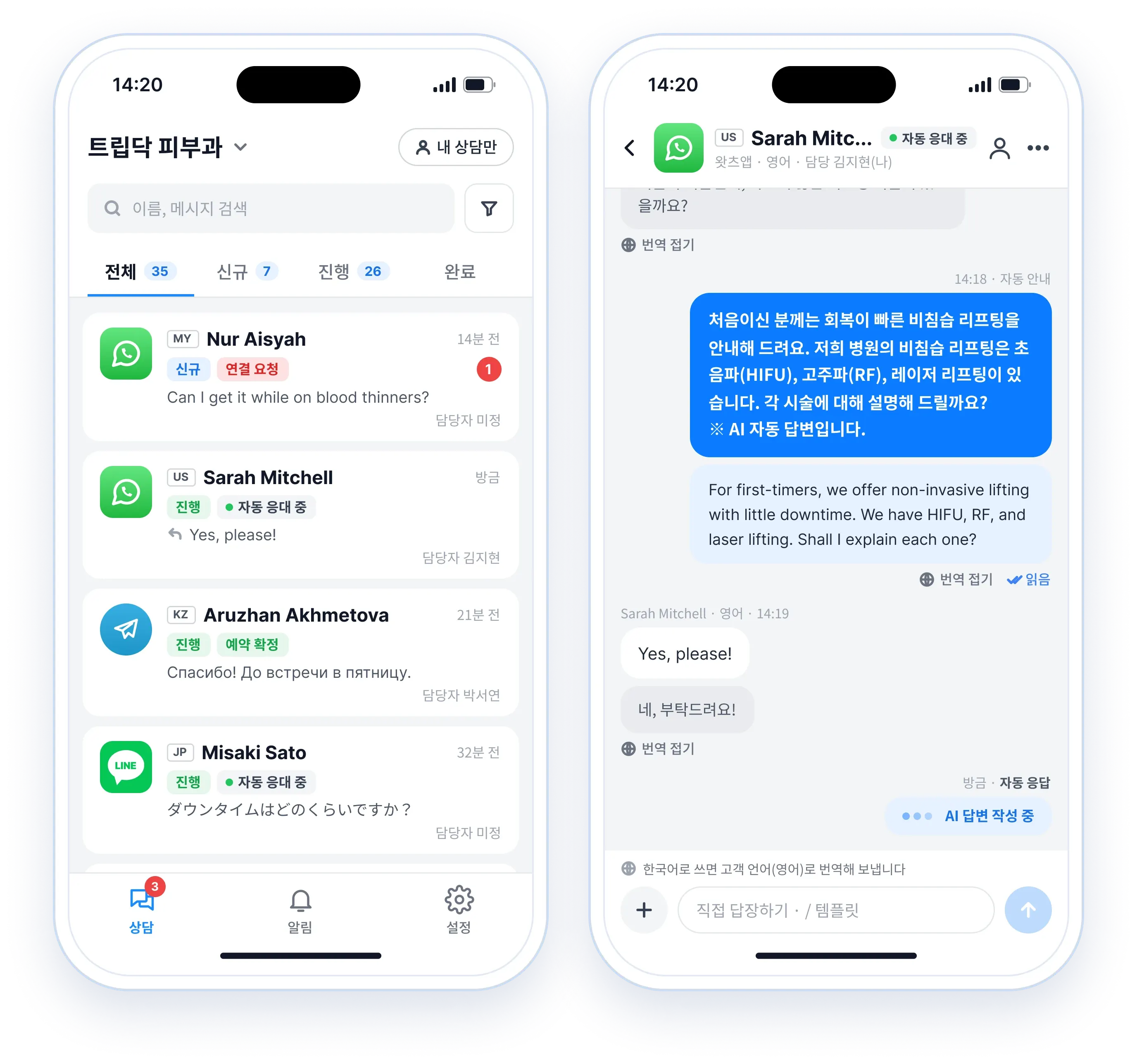
Away from the desk? Use the TripDoc AI Talk app

New inquiries and booking requests arrive as app notifications. Watch in real time how the AI is replying, and when a person needs to step in, join the conversation directly from the app.

  • Real-time push notifications
  • Monitoring of AI replies
  • Reply directly from the app
TripDoc AI Talk mobile app screens showing the conversation list and an AI reply that staff can take over

It does not end at booking: visits and revisits too

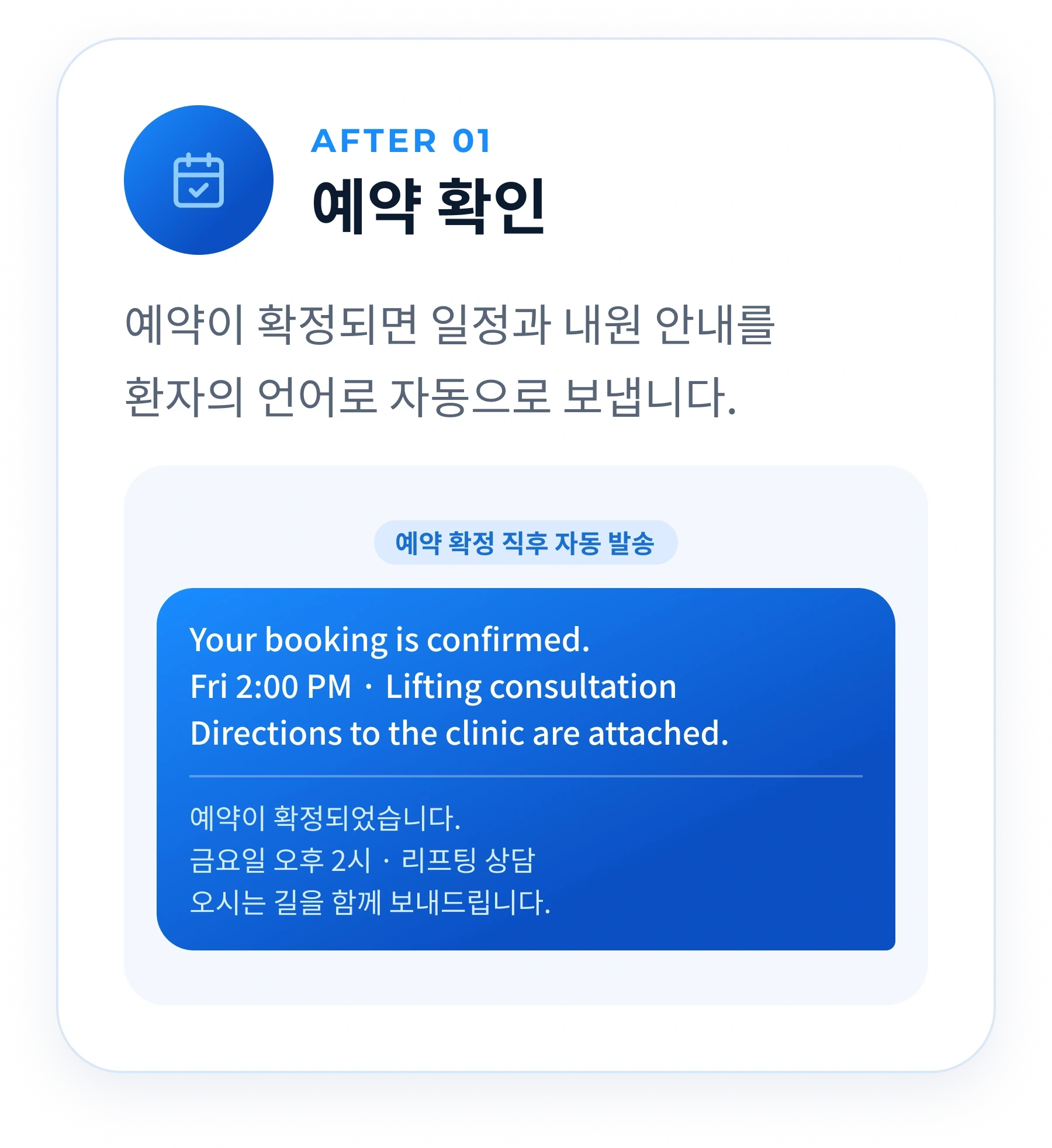
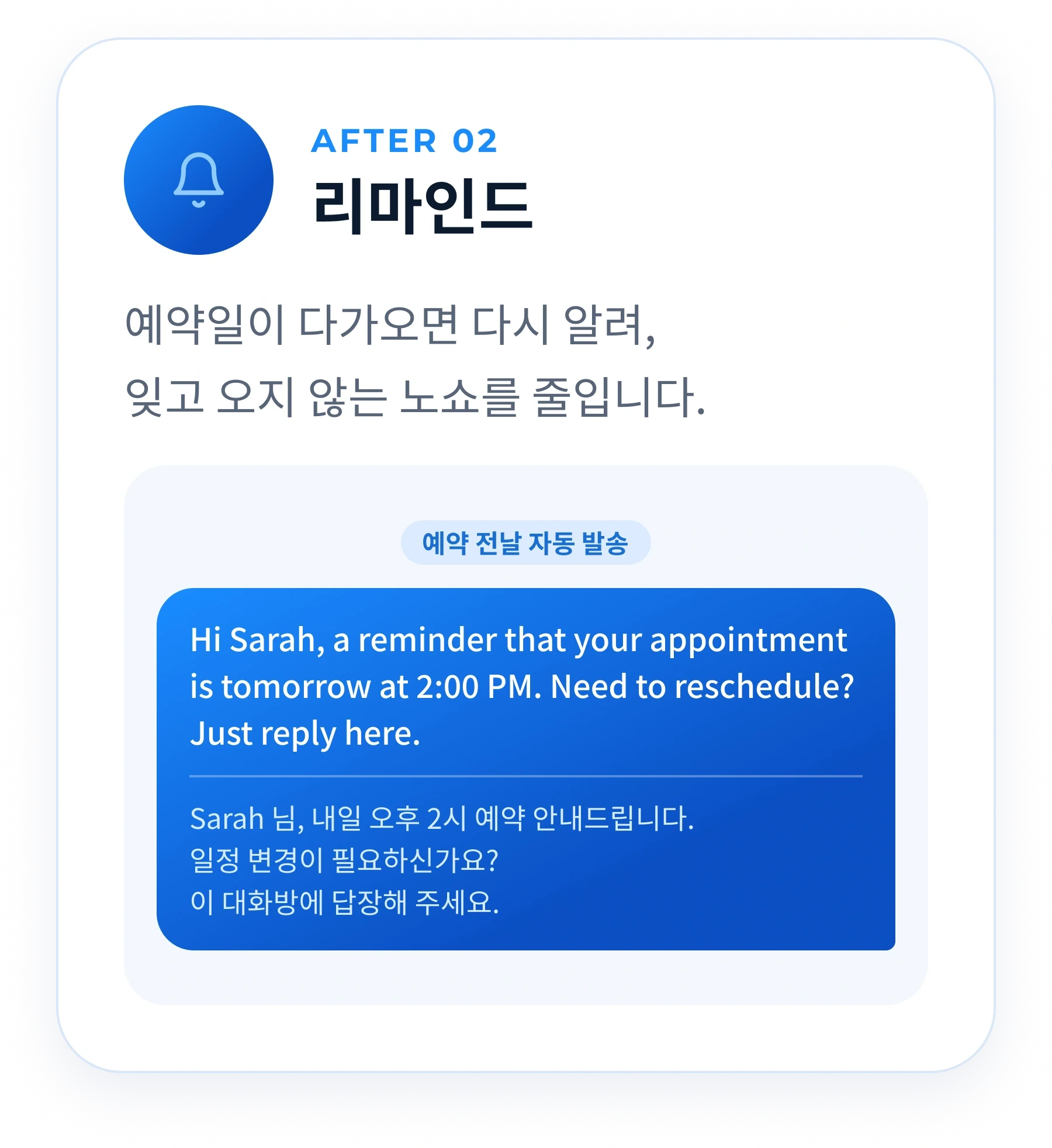
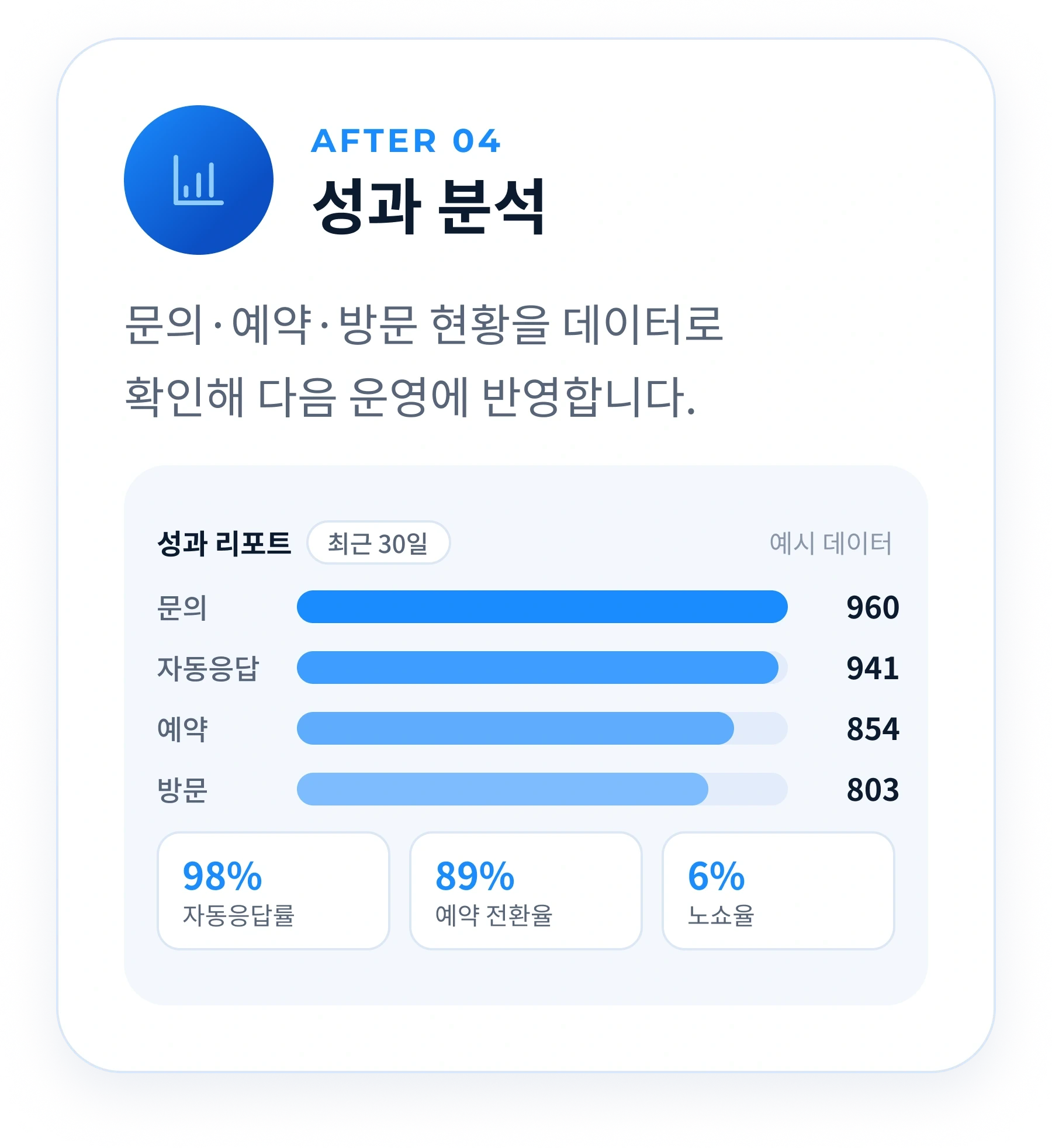
Once a booking is confirmed, the schedule and directions go out in the patient's language. A reminder the day before reduces no-shows, and a revisit message goes out when the next visit is due. Inquiries, bookings and visits are summarized in a report.

  • Booking confirmation and reminders
  • Revisit timing messages
  • Performance report

Messenger channel integration

Patients contact you on the messenger they already use, with no app to install

TripDoc AI Talk is a system for hospitals that connects to the messenger accounts your hospital already runs. The way patients contact you stays the same.

STEP 01 · Patient

They ask on the messenger they already use

Patients contact the hospital channel listed on your website and social media, just as they do now. No app to install and no sign-up.

  • KakaoTalk
  • Naver TalkTalk
  • WhatsApp
  • LINE
  • WeChat
  • Instagram
  • Facebook Messenger
  • Telegram
STEP 02 · Patient

Answers arrive in the same chat

Patients see only their usual conversation with your hospital's account, and replies reach that same chat at night and on weekends too.

Your hospital's official channel

Can I book laser toning?

Yes, Saturday at 10:30 AM is available.

STEP 03 · Hospital

TripDoc AI Talk answers and manages

The AI answers from your hospital's information, and staff see every conversation in the admin page and the hospital app.

  • Replies go out on the messenger the patient used
  • Replies your staff send themselves land in the same chat
  • Do patients need to install the TripDoc app?

    No. The TripDoc AI Talk app is for hospital staff. Patients do not need to install anything.

  • Do patients contact you through TripDoc?

    No. Patients message your hospital's own messenger directly and get the answer in the same chat.

  • Do you need to give patients a new contact channel?

    No. Keep using the channel links and QR codes already on your website and social media.

How is it different from a simple chatbot?

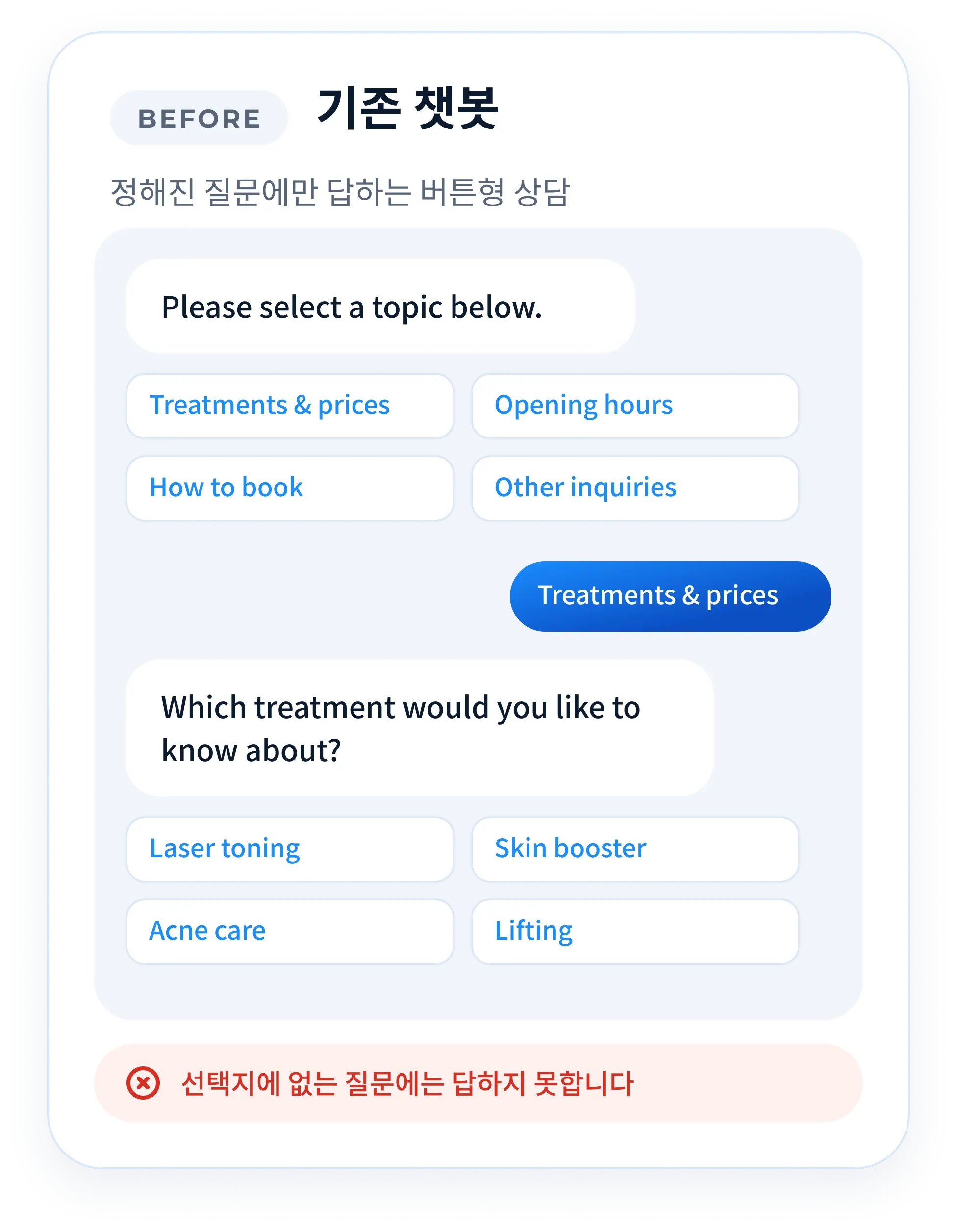
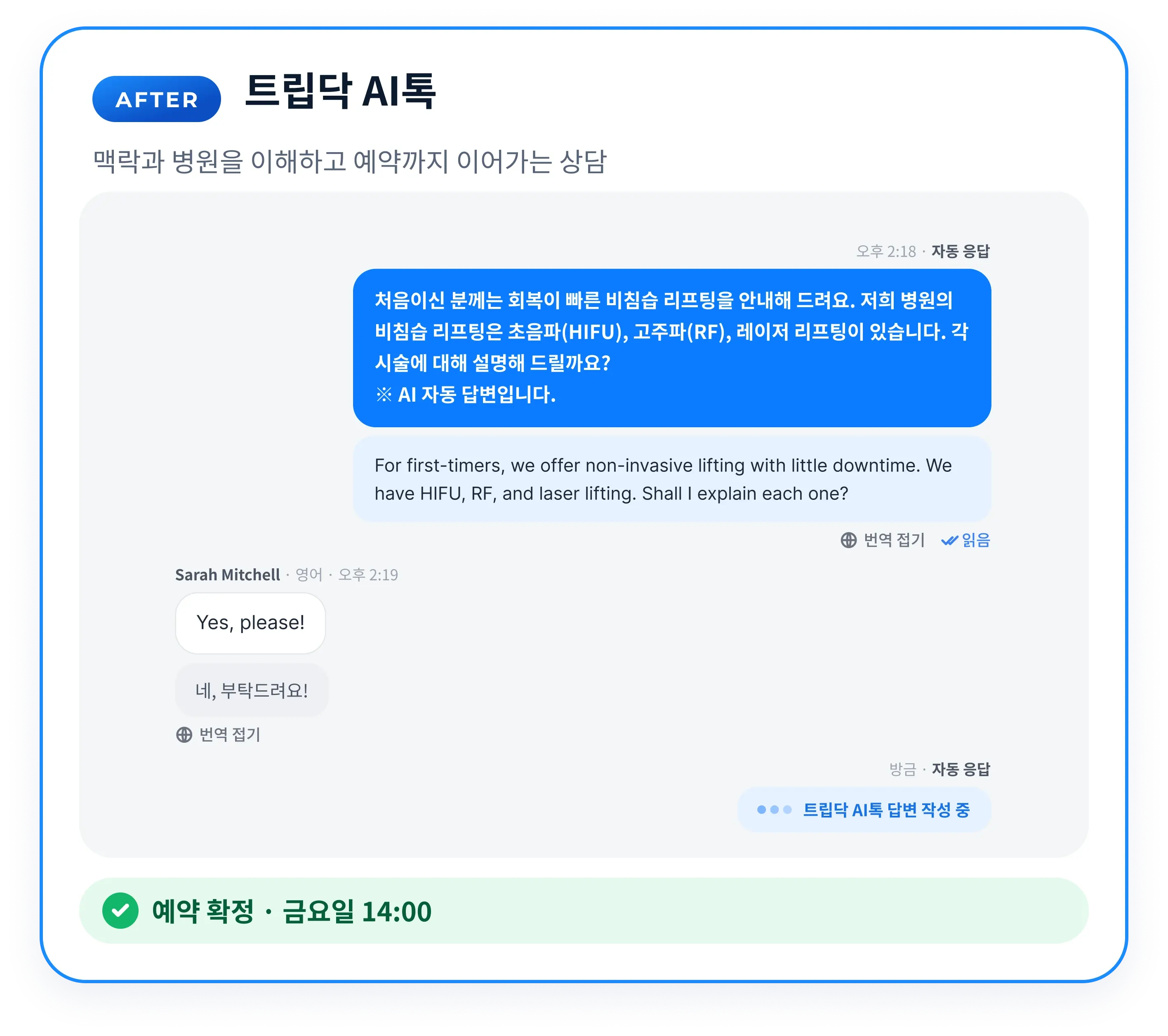
A button-based chatbot answers only predefined questions. TripDoc AI Talk understands the context of the conversation, the specialty and the hospital's information, and carries the patient through to a booking in their own language.

A conventional button-based chatbot

Example of a button-based chatbot that offers fixed options and cannot answer a question outside them
  • Patients can only pick from fixed options
  • Questions outside the options go unanswered
  • It replies in one language only
  • A person still has to make the booking

TripDoc AI Talk

Example TripDoc AI Talk consultation in which the AI understands the context of a question from a patient who has never had the procedure and carries it through to a booking
  • Understands the context of the conversation
  • Explains treatments and procedures from your hospital's information
  • Replies naturally in the patient's language
  • Carries the conversation through to a confirmed booking

The AI answers only within information the hospital has reviewed. Questions that call for a medical judgment, such as diagnosis or prescription, are not answered by the AI and are passed to hospital staff.

Is it safe to let an AI reply? Here is how safety is built in

Safety and legal risk, the things hospital directors worry about most, came first in the design. Three layers of protection, approval, separation and filtering, plus a data commitment.

In one line

The AI handles guidance and bookings. Medical judgment stays with your medical team.

  1. “Handing everything to an AI from day one feels risky.”

    Approval.For the first two weeks the service runs in draft approval mode: the AI drafts every reply, the coordinator checks it and only then is it sent. Automatic replies expand from the areas that have proven reliable, and the hospital decides how far automation goes.

  2. “What if the AI makes a diagnosis or a prescription?”

    Separation.Questions that need a professional medical judgment, such as diagnosis, prescription or treatment outcomes, and any emergency are flagged for review and handed to hospital staff automatically. The AI handles guidance and booking; medical judgments stay with the medical team.

  3. “What if it says something that breaks medical advertising law?”

    Filtering.Wording that could breach the Medical Service Act's advertising rules, such as guaranteed results, exaggerated claims or comparisons with other hospitals, is filtered automatically before a message goes out. Even the tone of the conversation is checked in two layers.

  4. “Who owns patient information and conversation data?”

    Data commitment.A personal data processing agreement is signed together with the service contract. The contract states that the knowledge trained for your hospital and all consultation data belong to the hospital.

What changes when you use it together with the TripDoc app?

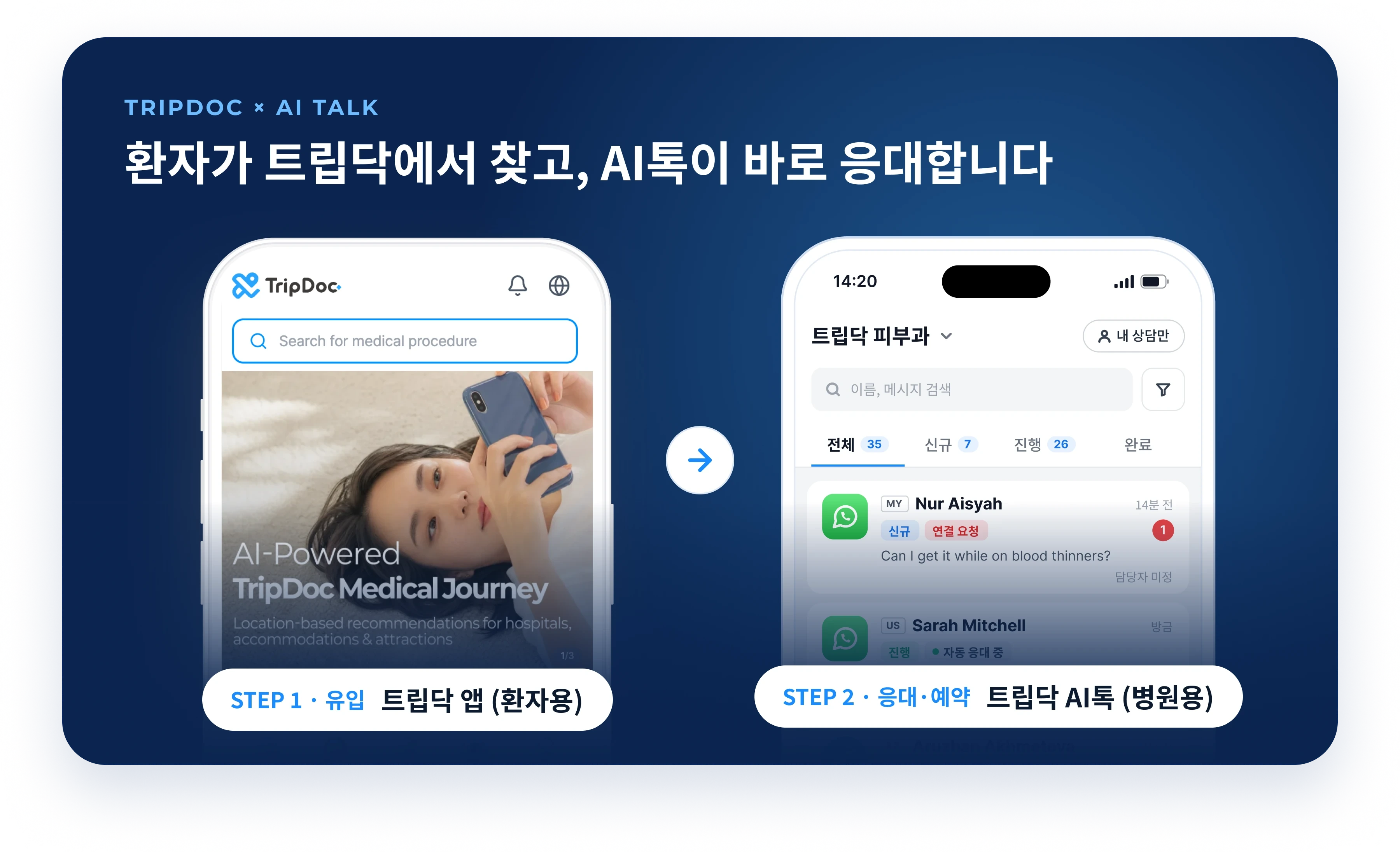
TripDoc brings the patient, and TripDoc AI Talk responds around the clock to complete the booking. Acquisition, booking and revisits are handled in one flow.

Diagram showing the flow from the TripDoc app for patients to TripDoc AI Talk for hospitals

Patients find you in the TripDoc app, and AI Talk replies at once

An inquiry from a patient who found your hospital in the TripDoc app goes straight to AI Talk and on to a booking. AI Talk works whether or not you are listed; listing joins the two services into one flow.

  • Domestic and international patients in one place

    Domestic patients write on KakaoTalk, international patients on overseas messengers. One AI Talk handles them all.

  • From inquiry to booking, with no referral commission

    TripDoc charges hospitals no referral commission. The focus is on turning every inquiry that comes in into a booking.

  • Google bookings on the same screen

    Messenger inquiries and domestic and international bookings made through Reserve with Google are all managed in one place on TripDoc.

See the hospital listing guide

Launch offer for the hospitals that start first

To mark the launch of TripDoc AI Talk, the hospitals that adopt it first receive a discount on the setup fee and the monthly fee. The offer ends when the places are filled.

Special launch offer

Founding hospitals

Limited to the first 10 hospitals

50% off the setup fee

  • Discounted monthly fee, locked in for 12 months
  • Top priority for onboarding

Early bird offer

Early bird hospitals

Limited to the first 30 hospitals

25% off the setup fee

  • Discounted monthly fee

TripDoc AI Talk is a paid service, separate from listing on TripDoc (which has no listing fee). It has a one-time setup fee and a monthly fee. Amounts and remaining places are explained during the consultation.

How does onboarding work?

The hospital requests a consultation and reviews the replies. TripDoc connects the messengers and trains the AI, working with you through a dedicated manager.

  1. Consultation and application

    A dedicated manager goes through your specialties, the messengers you use and the inquiries you receive most often, then explains the onboarding schedule.

  2. Hospital-specific setup

    The AI learns your hospital's information, such as specialties, treatments, procedures and opening hours, and the messenger channels are connected.

  3. Reply review

    For the first two weeks the service runs in draft approval mode, with the coordinator checking the AI's replies. Automatic replies expand from the areas that have been reviewed.

  4. Automatic replies begin

    The AI turns night and weekend inquiries into bookings. The hospital checks only the conversations that need attention, in the app.

Questions before getting started, by situation

When you worry about foreign-language replies

Do we need staff who speak foreign languages?

No. The AI replies in the language the patient writes in, and your staff see the Korean original alongside it. When a staff member replies directly, they write in Korean and the message is translated into the patient's language. There is no need to hire foreign-language staff.

Which messengers can be connected?

Eight messengers can be connected and managed on one screen: KakaoTalk, Naver TalkTalk, WhatsApp, LINE, WeChat, Instagram, Facebook Messenger and Telegram. KakaoTalk inquiries from domestic patients and overseas messenger inquiries from international patients are handled on the same screen.

When you worry about what the AI says

What happens if the AI gives a wrong answer?

For the first two weeks the service runs in draft approval mode, so the coordinator checks each AI-drafted reply before it is sent. Automatic replies expand from reviewed areas, and the hospital decides how far automation goes. Wording that could breach medical advertising rules, such as guaranteed results or comparisons, is filtered automatically before sending.

How does it reply to a patient who asks for a diagnosis or prescription?

The AI does not answer. Questions that need a medical judgment, such as diagnosis, prescription or treatment outcomes, and any emergency are flagged for review and passed to hospital staff immediately. The AI answers only with information the hospital has reviewed, such as treatment guidance, procedures and booking.

When you want to know how it runs

Can our staff reply directly?

Yes. In the web admin screen and the TripDoc AI Talk app you can watch in real time how the AI is replying and join the conversation to reply yourself whenever needed. New inquiries and booking requests arrive as app notifications.

What happens after a booking is made?

Once a booking is confirmed, the schedule and directions are sent in the patient's language. A reminder the day before reduces no-shows, and a revisit message goes out when the next visit is due. Inquiries, bookings and visits can be reviewed in a report.

Who owns the consultation data and personal data?

The hospital does. A personal data processing agreement is signed together with the service contract, and the contract states that the knowledge trained for your hospital and all consultation data belong to the hospital.

When you are ready to start

Can a hospital that is not listed on TripDoc use it?

Yes. TripDoc AI Talk can be adopted whether or not your hospital is listed on TripDoc. If you are listed, inquiries from the TripDoc app and bookings made through Reserve with Google are also managed in AI Talk, all in one place. The hospital listing page explains the listing process.

How do we request a consultation?

Send the consultation request form at the bottom of this page, or email [email protected] or call 1551-8747. We go through your specialties, the messengers you use and the inquiries you receive most often, then begin the hospital-specific setup.

Request a TripDoc AI Talk consultation

Leave your hospital's details and contact information, and a dedicated manager will review them and get in touch. We will also tell you which launch offer places are still open.

This form is only for TripDoc AI Talk consultations. To list your hospital on TripDoc, use the hospital listing page. For business partnerships, use the partnership inquiry page.

Hospital details
Contact person

0/400

A hospital that never misses a patient can be yours

An AI trained on your hospital's information consults patients in their own language 365 days a year, 24 hours a day, while your coordinator spends the day on their real work. Request a consultation while the launch offer lasts: email [email protected] or call 1551-8747.

Request a consultation